
Primeworks Security Brief #002
Court Order Phishing: Would You Click?
An official-looking legal document, a familiar sender and the threat of court action can create a powerful reason to click. This real message received by Primeworks shows why stopping to verify matters more than how convincing an email looks.
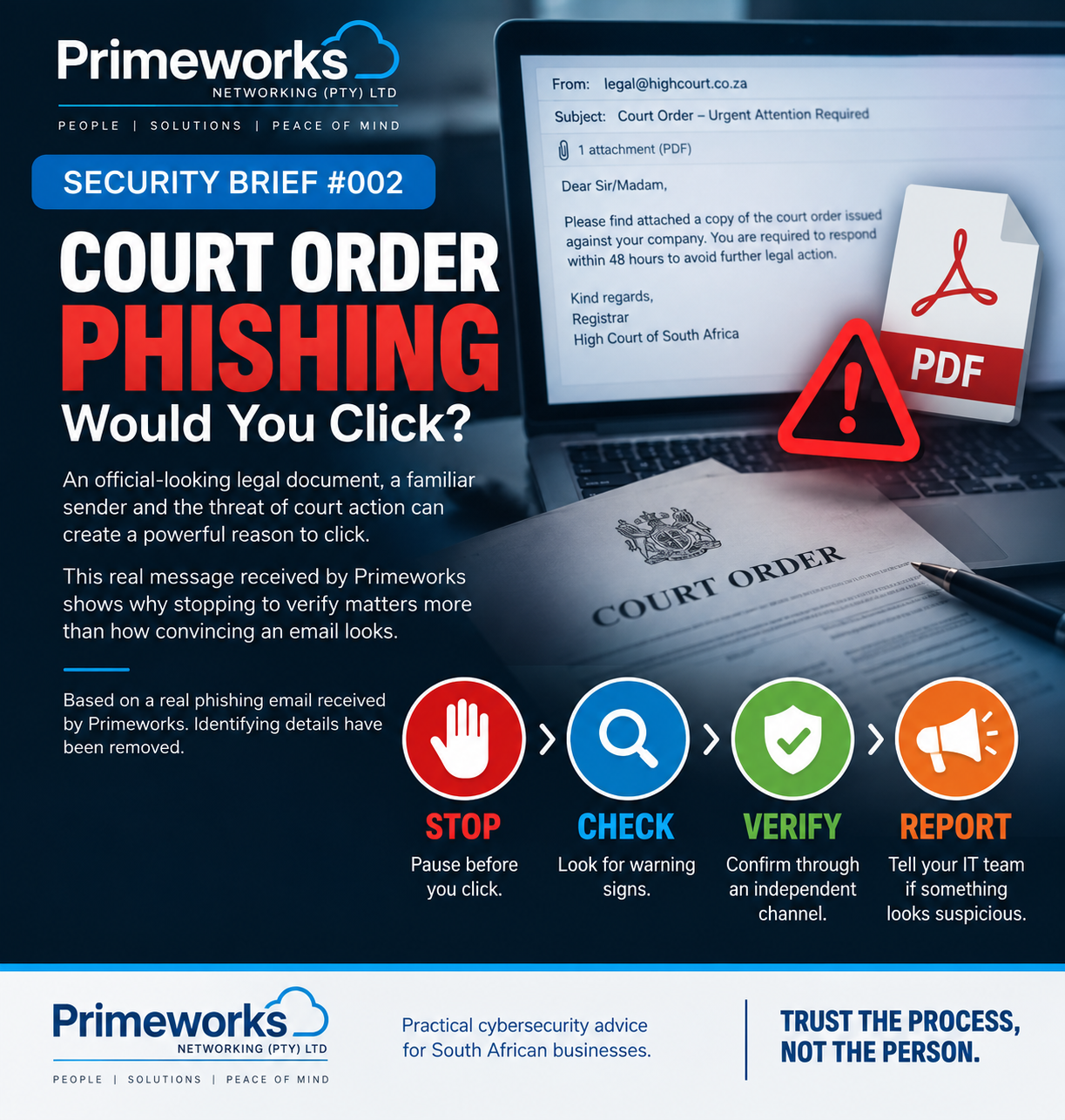
Real incident, anonymised for publication. A Primeworks user received an unexpected “Court-Order” email containing an official-looking PDF. The message was fraudulent, but it illustrates a much broader lesson: phishing succeeds by persuading us to act before we verify.
The threat
Phishing messages increasingly imitate communications we are conditioned to take seriously: legal notices, invoices, Microsoft alerts, bank messages, courier notifications and instructions from colleagues or executives.
The attacker does not need the document to survive detailed scrutiny. They need it to look convincing for long enough that you click a link, open a file, enter credentials or make contact through a channel they control.
How this attack worked
The email used a supposed court order to create fear and urgency. The attached PDF included legal-looking branding, a case reference, an approval stamp and a button inviting the recipient to view the order.
That combination is effective because the natural response to apparent legal action is to find out what is happening immediately. The safer response is the opposite: slow down and verify the communication independently.
Why it matters
A successful phishing click can lead to stolen Microsoft 365 credentials, malware, compromised email accounts, fraudulent payments or further attacks against colleagues and customers.
A familiar sender does not remove the risk. If a genuine mailbox has been compromised, an attacker may send malicious messages from the real account. Email authentication can help detect forgery, but it cannot prove that the person currently controlling an account is trustworthy.
Warning signs to look for
- Unexpected communication. You were not expecting the legal notice, invoice, password reset or document.
- Fear, urgency or pressure. The message tries to make you act before you have time to think.
- Vague or missing information. Important names, parties, dates or details cannot be independently confirmed.
- An unverifiable link. The destination does not belong to the organisation the message claims to represent.
- Inconsistent details. Names, dates, locations, signatures or institutions do not form a coherent story.
- A familiar sender used as proof. A recognised name or genuine email address should not override an unusual request.
Poor spelling or awkward language can still be a warning sign, but do not rely on it. Modern phishing messages can be polished, professional and grammatically correct.
What you should do
- Stop.Do not allow a threat, deadline or senior-sounding sender to rush you.
- Check.Inspect the actual link destination and look for information that can be independently confirmed.
- Verify.Contact the organisation or person through an official website, company directory or contact details you already know. Do not use the contact information supplied in the suspicious message.
- Report.Send the original message to your IT provider and use your organisation’s phishing-reporting process.
If you already clicked
Do not hide the mistake or wait to see what happens. Report it immediately. If you entered credentials, your IT provider may need to reset the password, revoke sessions and check MFA methods, mailbox rules and recent sign-ins. If banking or payment information was disclosed, contact the relevant financial institution promptly.
Early reporting can make a significant difference to the impact of an incident.
How Primeworks helps
Primeworks helps small and growing South African businesses strengthen email protection, improve Microsoft 365 security, protect and monitor endpoints and accounts, and give staff practical security-awareness guidance.
If you need help checking a suspicious message or possible account compromise, use the Primeworks contact form or call 011 887 3900.
Key takeaway
Phishing is no longer defined by obvious spelling mistakes or badly designed emails. When a message is unexpected, urgent or asks you to click, sign in, pay or disclose sensitive information, verify it through a separate trusted channel before acting.
This Security Brief provides cybersecurity awareness information and is not legal advice. If you may have received a genuine legal notice, verify it independently and obtain advice from a qualified legal professional.
Source
Stop. Check. Verify. Report.
Make verification part of the way your business works.